CSC 171 LAB #12
FALL 2001
GOAL:
1.
Become
familiar with the linked list data structure.
TASKS:
Write a JAVA applet that manipulates
lists.
BACKGROUND:
A self-referential class contains an instance variable that refers to another object of the same class type. For example, consider the class
class stringNode {
private String data;
// the “data”
private charNode next; // the “link”
}
which we might graphically represent as
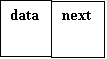
If we used such a class, where each node represents a String. So, a list of strings:

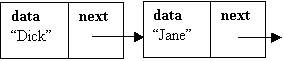
In order to use such structures, you need to understand how they operate. In this lab, you will write an applet that manipulates lists of strings.
STEPS:
1.
Start
with the sample code given above. You need to include constructors, as well as accesor
methods (“set” and “get” methods) for each of the instance variables.
2.
Now
write a second class – a “stringList” class. This class “has-a” private stringNode
instance variable representing the head of this list. The head node is the ONLY
instance variable allowed - for this
lab you are NOT allowed to have a node representing the end of the list.
3.
Write
an “public void insertAtFront(String s)” method for your list.
4.
Write
a “public String allStrings()” method that returns all the strings in the list
concatenated into one big string. Each string from the list should be separated
from the others by a new line character ‘\n’.
5.
Ok,
now write the Applet. Your applet should include a textbox for input and a
textArea for output. The applet must have an instance variable of type “stringList”
– (NOT type “stringNode”). When you type into the textbox and hit return, the contents of the textbox should be
inserted at the front of the list – the list should automatically be displayed
in the text area.
6.
Write
a method “removeFromFront()” for class stringList – it should remove the head
node from the list. It should have no effect on an empty list. Add a button to
your applet that invokes this function. The textArea should be automatically
updated when you click this button.
7.
Write
a method “removeFromBack()” for class stringList – it should remove the last
node from the list. It should have no effect on an empty list. Add a button to
your applet that invokes this function. Since you cannot use a “lastNode”
variable, your method should walk down the list, until it finds a node whose
next node has a next node of null – then simply set the next node to null. The
textArea should be automatically updated when you click this button.
8.
Write
a method “insertAtBack(String)” for class stringList – it should insert a new
string at the end of the list. Add a button to your applet that invokes this
function. When this button is invoked, you grab the text out of the textbox for
the insertion. (So, if you type into the textbox and hit enter, then it goes to
the front of the list. If you type into the textbox but click the button rather
than hit enter, then it goes to the end of the list). Since you cannot use a “lastNode”
variable, your method should walk down the list, until it finds a node whose
next node is null – then simply set the next node to a new node. The textArea
should be automatically updated when you click this button.
9.
Write
a method “reverse()” for class stringList() – add a button to reverse the list.
You should be able to reverse twice to get the same list back. Reversal is a
fairly straight forward recursive algorithm.
10.
Write
a method “downsize()” which removes every other node from the list. Add the
button.
11.
Give
the paper to your TA. This completes the hand in process. The deadline is one
week – no late assignments accepted.
12.
The
demo can run from the local machine. All that should be in the directory is
your jar file and your html file.