
|
BlackBoard:
|
|
|
This assignment deals with optimizing memory intensive code. Image
processing offers many examples of functions that can benefit from
optimization. In this lab, we will consider two image processing
operations: rotate, which rotates an image
counter-clockwise by 90° and smooth, which
“smooths” or “blurs” an image.
For this lab, we will consider an image to be represented as a
two-dimensional matrix M, where
Mi,j denotes the value of the
(i,j)th pixel of M. Pixel values are
triples of red, green, and blue (RGB) values. We will only
consider square images. Let N denote the number of
rows (or columns) of an image. Rows and columns are numbered, in
C-style, from 0 to N-1.
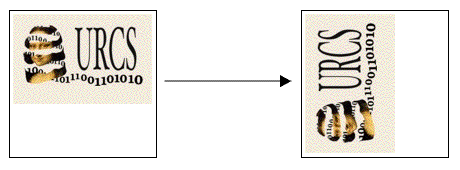
The rotate operation turns an image 90°
counter-clockwise, by moving each element M1[i][j]
into M2[N-j-1][i]. Pictorially,
The smooth operation is implemented by replacing every pixel
value with the average of all the pixels around it (in a maximum of
3 X 3 window centered at that pixel). Consider the
following figure:
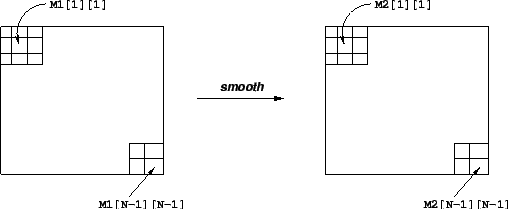
The values of pixels
M2[1][1] and M2[N-1][N-1] are given below:
![Value of pixel M2[1][1]](A5/img12.gif)
![Value of pixel M2[N-1][N-1]](A5/img13.gif)
You may work in a group of up to two people in solving the problems for this assignment. The only “hand-in” will be electronic. Any clarifications and revisions to the assignment will be posted to Blackboard.
Start by copying /u/cs252/labs14/lab4/perflab-handout.tar to a
protected directory in which you plan to do your work.
(You can also download a copy HERE.)
Then give
the command: tar xvf perflab-handout.tar. This
will cause a number of files to be unpacked into the directory.
The only file you will be modifying and handing in is
kernels.c. The driver.c program is a
driver program that allows you to evaluate the performance of your
solutions. Use the command make driver to generate
the driver code and run it with the command ./driver.
Looking at the file kernels.c you’ll notice a C
structure team into which you should insert the requested
identifying information about the one or two individuals comprising your
programming team. Do this right away so you don’t
forget. Use your login ids and email adresses for your CS
accounts.
Team name in the struct is of the form “ID”, where “ID” is your CS account login name, if you are working alone, or “ID1+ID2”, where “ID1” is the CS login name of the first team member and “ID2” is the CS login name of the second team member.
typedef struct {
    unsigned short red;   /* R value */
    unsigned short green; /* G value */
    unsigned short blue;  /* B value */
} pixel;
As can be seen, RGB values have 16-bit representations. An image
I is represented as a one dimensional array of pixels,
where the (i,j)th pixel is
I[RIDX(i,j,N)]. Here N is the width
(height) of the image matrix, and RIDX is a macro defined
as follows:
#define RIDX(i,j,N) ((i)*(N)+(j))See the file
defs.h for this code.
90° and stores the result in destination
image dst. N is the width (height) of
the image.
void naive_rotate(int N, pixel *src, pixel *dst) {
    int i, j;
    for(i=0; i < N; i++)
        for(j=0; j < N; j++)
            dst[RIDX(N-1-j,i,N)] = src[RIDX(i,j,N)];
    return;
}
The above code scans the rows of the source image matrix, copying to the
columns of the destination image matrix. Your task is to rewrite
this code to make it run as fast as possible using techniques like code
motion, loop unrolling and blocking.
See the file kernels.c for this code.
The smoothing function takes as input a source image src and returns the
smoothed result in the destination image dst. Here is
part of an implementation:
void naive_smooth(int N, pixel *src, pixel *dst) {
    int i, j;
    for(i=0; i < N; i++)
        for(j=0; j < N; j++)
            dst[RIDX(i,j,N)] = avg(N, i, j, src); /* Smooth the (i,j)th pixel */
    return;
}
The function avg returns the average of all the pixels
around the (i,j)th pixel. Your task is to optimize
smooth (and avg) to run as fast as
possible. (Note: The function avg is a local
function and you can get rid of it altogether to implement
smooth in some other way.)
This code (and an implementation of avg) is in the file
kernels.c.
Our main performance measure is CPE or Cycles per
Element. If a function takes C cycles to run for
an image of size N X N, the CPE value is
C/N2. Table 1 summarizes the performance
of the naive implementations shown above and compares it against an
optimized implementation. Performance is shown for for 5
different values of N. All measurements were made on
cycle2.csug.rochester.edu. As you know from the last project, these results may
be very different on different machines. Your code will be tested and graded on
cycle2 so you should keep this in mind as you program. Note in
particular that the reference baseline CPEs listed are specific to
cycle2.
The ratios (speedups) of the optimized implementation over the naive one
will constitute a score of your implementation. To
summarize the overall effect over different values of N, we
will compute the geometric mean of the results for these 5
values. That is, if the measured speedups for N =
{32,64,128,256,512} are R32,
R64, R128,
R256 and R512 then we
compute the overall performance as
![\begin{eqnarray*} R & = & \sqrt[5]{R_{32} \times R_{64} \times R_{128} \times R_{256} \times R_{512}}\end{eqnarray*}](A5/img25.gif)
| ||||||||||||||||||||||||||||||||||||||||||||||||||||||||||||||||||||||||
To make life easier, you may assume that N is a multiple of
32. Your code must run correctly for all such values of
N, but we will measure its performance only for the 5
values shown in Table 1.
We have provided support code to help you test the correctness of your
implementations and measure their performance. This section
describes how to use this infrastructure. The exact details of
each part of the assignment are described in the following
section.
Note: The only source file you will be modifying is
kernels.c.
You will be writing many versions of the rotate and smooth routines. To help you compare the performance of all the different versions you’ve written, we provide a way of “registering” functions.
For example, the file kernels.c that we have provided
you contains the following function:
void register_rotate_functions() {
    add_rotate_function(&rotate, rotate_descr);
}
This function contains one or more calls to
add_rotate_function. In the above example,
add_rotate_function registers the function
rotate along with a string rotate_descr which
is an ASCII description of what the function does. See the file
kernels.c to see how to create the string
descriptions. This string can be at most 256 characters
long.
A similar function for your smooth kernels is provided in the file
kernels.c.
The source code you will write will be linked with object code that we supply into a “driver” binary. To create this binary, you will need to execute the command
unix> make driverYou will need to re-make driver each time you change the code in
kernels.c. To test your implementations, you
can then run the command:
unix> ./driverThe driver can be run in four different modes:
rotate() and
smooth() functions are run. This is the mode we will
run in when we use the driver to grade your hand-in.
If run without any arguments, driver will run all of your
versions
(default mode). Other modes and options can be specified by
command-line arguments to driver, as listed below:
-g : Run only rotate() and
smooth() functions (autograder mode).
-f <funcfile> : Execute only those versions
specified in <funcfile> (file mode).
-d <dumpfile> : Dump the names of all versions
to a dump file called <dumpfile>, one line to a
version (dump mode).
-q : Quit after dumping version names to a dump
file. To be used in tandem with -d. For
example, to quit immediately after printing the dump file, type
./driver -qd dumpfile.
-h : Print the command line usage.
Important: Before you start, you should fill in the struct in
kernels.c with information about your team (group
name, team member names and email addresses). This struct is
just like the one for the Data Lab (assignment 1).
In this part, you will optimize rotate to achieve as low a
CPE as possible. You should compile driver and then
run it with the appropriate arguments to test your
implementations. For example, running driver with the
supplied naive version (for rotate) generates the output
shown below:
unix> ./driver
Teamname: ta
Member 1: ta
Email 1: ta's email address

Rotate: Version = naive_rotate: Naive baseline implementation:
Dim             64      128     256     512     1024    Mean
Your CPEs       3.3     4.8     7.3     11.9    14.3
Baseline CPEs   3.3     4.8     7.0     11.8    14.4
Speedup         1.0     1.0     1.0     1.0     1.0     1.0
In this part, you will optimize smooth to achieve as low a CPE as possible.
For example, running driver with the supplied naive
version (for smooth) generates the output shown
below:
unix> ./driver
Teamname: ta
Member 1: ta
Email 1: ta's email address

Smooth: Version = naive_smooth: Naive baseline implementation:
Dim             32      64      128     256     512     Mean
Your CPEs       76.4    77.2    77.4    77.5    77.7
Baseline CPEs   76.2    77.2    77.4    77.6    77.7
Speedup         1.0     1.0     1.0     1.0     1.0     1.0
Some advice: Look at the assembly code generated
for rotate and smooth. Focus on
optimizing the inner loop (the code that gets repeatedly executed in a
loop) using the optimization tricks covered in class and in chapters 5
and 6 of the text. (Note: if you didn’t read chapter 5
carefully before the midterm, you’ll want to read it now. You
won’t do well on this assignment without it.)
The smooth function is more
compute-intensive and less memory-sensitive than the rotate
function, so the optimizations are of somewhat different flavors.
You may want to consult the authors’ “Web Aside” on
using
blocking to increase temporal locality.
You may write any code you want, as long as it satisfies the following requirements:
kernels.c. You are
allowed to define macros, additional global variables, and other
procedures in this file.
Your solutions for rotate and smooth will each
count for 50% of your grade. The score for each will be based on
the following:
rotate and smooth if they are correct and
achieve mean CPE speedups above thresholds 1.5 and
2.0 respectively. We will award up to 10 points
extra credit for each function if you match or beat the performance of
the optimized version described above. You will get partial credit
for a correct implementation that does better than the supplied naive
one.
Before noon, Thursday, March 20, send email to
 containing answers to the
following questions (a single email per team is acceptable).
Please use the subject
containing answers to the
following questions (a single email per team is acceptable).
Please use the subject
[cs252] Assignment 5 Trivia - uname1, uname2
for your email.
foo() and
bar() below. Do they do
the same thing? If not, why not? If so, which would you
expect to be faster and why? (Assume that arrays a[100] and b[100]
are initialized globals.)
void foo() {
    int i;
    for (i = 0; i < 100; i++){
        a[i] = a[i] + b[i];
    }
}

void bar() {
    int i = 0;
    while (i < 100){
        a[i] += b[i++];
        a[i] += b[i++];
        a[i] += b[i++];
        a[i] += b[i++];
    }
}
naive_smooth?
When you have completed the lab, you will hand in one file,
kernels.c, that contains your solution. Here is how
to hand in your solution:
rotate() and smooth() functions
correspond
to your fastest implementations, as these are the only functions
that will be tested when we use the driver to grade your assignement.
kernels.c file in a directory by itself, go into that
directory, and type:
/u/cs252/bin/TURN_IN .Note that there’s a dot in that command!
For the “trivia” assignment: 11am, Thursday, March 20.
For the main assignment: 11:59pm, Monday, March 31.
