Project 1
The Polynomial ADT
We can define an abstract data type for single-variable
polynomials (with non-negative exponents) by using a list. Let 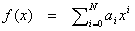 . If most of the coefficients ai are nonzero we could
use a simple array to store the coefficients and write routines to perform
addition, subtraction, multiplication, differentiation, and other operations on
these polynomials.
. If most of the coefficients ai are nonzero we could
use a simple array to store the coefficients and write routines to perform
addition, subtraction, multiplication, differentiation, and other operations on
these polynomials.
An array implementation would be adequate for dense
polynomials, where most of the terms are present, but if  and
and  , then the running time is likely to be unacceptable. One
cans see that if arrays were used, then most of the time is spend multiplying
zeros and stepping through what amounts to nonexistent parts of the input
polynomials. This is always undesirable.
, then the running time is likely to be unacceptable. One
cans see that if arrays were used, then most of the time is spend multiplying
zeros and stepping through what amounts to nonexistent parts of the input
polynomials. This is always undesirable.
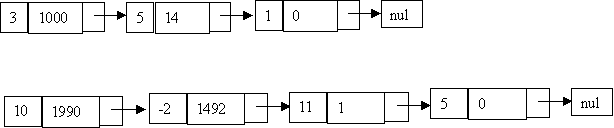
An alternative is to use a singly linked list. Each term in
the polynomial is contained int one cell, and the cells are stored in
decreasing order of exponents. For instance, the linked lists below represent  and
and .
.
Assignment
In this class, we will be doing automatic grading for part of your grade for all projects. This makes grading more fair for you the students, and it makes it easier for us to grade 110 projects. Your project's functionality will be graded automatically, while your programming style as well as your readme will be graded by hand.
Because this is such a large class, and also for the automatic grading, there will be strict guidelines as to exactly what needs to be handed in, and how it should be handed in. You will receive details for this soon, but we will specify here what info you will need at least to get started in programming this project.
You will notice from the grading scale of this project (see bottom of page) that you get points for a readme, code style, and functionality of your program. The following briefly describes each. Check back soon as we will be adding to the website general guidelines to be followed in each project
Readme Guidelines
Coming soon.Programming Style Guidelines
Coming soon. Be warned, however, that 18% of your grade is Code Style (see bottom of page) so you need to plan on using good documentation style, variable naming, etc. in your program. We will be looking at your style!For now, know that you will need to turn in a neat, stapled hard copy of your code as well as printed documentation html files generated by javadoc. You will be required to submit your project electronically as well for automatic grading (see seciton below).
Functionality Guidelines for Automatic Grading
Since we are using automatic grading to test the functionality of your program, it will need to conform to strict standards. Any deviation from these standards will result in it not working with the automatic grader as well as a substantial loss of points for you. For each project, you will get a list of specifictations which your program must conform to EXACTLY. This will actually be good practice for you, since most software engineers use similar specs when coding a large project with many people involved. Consider yourself as writing a portion of a program (the project) which will fit into a bigger program (the automatic grading program). You will still need to make a stand-alone program to test your portion of the program, but in the end, you will need to submit a class (or group of classes) which will then be plugged into the automatic grader and then tested.Part of the specification will be given to you in the form of a java interface. You will write a class which must implement this interface, which means that your class must at least have methods that match the ones in the interface definition (of course it can have more methods and variables as well). Because both the concepts of coding as PART of a program and using interfaces in java are probably new to a lot of you, we will be providing a testing environment for your code for this project only. This will let you test if your class implements the interface properly as well as give you an example of what the bigger program (the automatic grader) your code will be plugged into will look like.
You will be required to submit a class that will plug into the automatic grader. You will also be required to submit an application that demonstrates and tests the key functionality of your implementation.
Project specs
You can download both the interface files and the sample program here. You will need to unzip this file and store it in a subdirectory named grader. Because this is using a package, the subdirectory must be named this.The interface file you have to implement is Polynomial.java. You will have to create a class that implements this interface and write methods that correspond to the methods in this class. Notice also that Polynomial.java implements StudentSolution.java which has just 2 methods that will give us your name and email address. You will need to implement these methods in your derived class as well (note that you won't have to specifically put StudentSolution in your implements clause since it is inherited by Polynomial). If you don't implement all of these methods then Java will give you an error. Look inside the files Polynomial.java nd StudentSolution.java to get more details of exactly what each method is supposed to do.
Since many of you will be new to interfaces, we have also provided a sample solution to the problem that implements the Polynomial interface. You can download it here. This is a class called StupidSolution. It is called that because it is not the right solution. It implements the program incorrectly. It is just there so you can get a feel for how to implement an interface. With the interface specs above, you also downloaded a test program called PolyTest, which is a simple GUI interface created by Scott Stoness (a grad student) to allow you to test your Polynomial class. To use it, you will need to put all of your code for your class in the directory above the grader subdirectory. If you want to try it with StupidSolution, your directory should have StupidSolution.java, StupidSolution.class, and a subdirectory called grader with all of the files you downloaded before. To run the program, you have to run it from the directory where StupidSolution is. You just need to put java grader.PolyTest to run it. This notation is there because the interfaces and the PolyTest program are in a package called grader. You really don't need to understand packages to plug in your own assignment, though. Also, in case you have to recompile the grader package for some reason (you shouldn't because you should not change the code in grader, especially the interfaces) you just do javac grader/*.java.
A final note: DO NOT change the interface files (Polynomial.java and StudentSolution.java)! if you do so, your class will not be compatible with the automatic grader and you will get a very bad grade! You will only turn in the contents of your directory, nothing from the grader directory.
The Polynomial Interface
You must implement the Polynomial interface (Polynomial.java). This interface extends StudentSolution (StudentSolution.java). So in the end, your class will be required to implement a total of 9 methods (7 from Polynomial and 2 from StudentSolution). These are the methods with a description of what they need to do. Note that your method headers must look exactly like these. Any change to them will result in your program being incompatible with the automatic grader.
public String getName();
This method returns your name as it appears in the class roll.
public String getEmail();
This method returns the email address you would like your
score sent to.
public void zeroPolynomial();
This method resets the polynomial to 0.
public void insertTerm(double coef, int exp);
This method will insert a term into the polynomial. If a term
for the given exponent (exp) already exists, it is overwritten.
public Polynomial add(Polynomial rhs);
This method will add the polynomial to the polynomial given as rhs
and return the new polynomial. Note: The polynomial that this method
occurs in should not be affected by this method. You should put
the results in a new polynomial and not touch either of the ones
you are adding. this is very important!
public Polynomial multiply(Polynomial rhs);
This method will multiply the 2 polynomials and return the answer. It should
work the same as the add method and not change either of the original
polynomials.
public double getCoefficient(int power);
Given an exponent (power) this will return the coefficient of the
corresponding term. Note: if no term exists for this power, then
the coefficient returned should be 0.
public int getFirstExpGE(int power);
This method should, given an exponent, return the first exponent
in the polynomial greater or equal to power, which has a non-0 coefficient.
If there is no such power, then your routine should return -1.
For example, if you have the polynomial 2.0x^5 + -3.0x^2 + 9.0x + 3
then getFirstExpGE(0) should give you 0 (since there is a term for
the zeroth power, namely 3). getFirstExpGE(1) = 1 (since there
is a term for 1). getFirstExpGE(3) = 5, since there is no 3 term
and the next one up is 5 (2.0x^5). and getFirstExpGE(6) = -1 (there is
no term greater than or equal to 6).
public String toString();
This method is very very very important. It must be implemented
exactly according to these specification in order for the automatic
grader to work. Basically, we need everybody's string version of their
polynomial to look exactly the same so we can grade it automatically.
This method will return the string version of the polynomial. The rest of
this will describe what that should look like. Pay attention to everything
here, even the spaces have to be exact. Here are the rules:
- Terms must be printed out in the order from highest exponent
to lowest exponent.
Example, it should be 2.0x^5 + -3.2x^3 + -11.0x + -5.3 not -5.3 + -11.0x + -3.2x^3 + 2.0x^5 or anything else. - All terms (even negative terms must be separated by
a space a plus sign (+) and a space.
Example: Correct way is 2.0x^5 + -5.3 not 2.0x^5+-5.3 and not 2.0x^5 - 5.3 - The first term in the list should not have a plus sign and spaces in front
of it.
Example: correct way is 2.0x^5 + -5.3 not + 2.0x^5 + -5.3 - You should have no extra characters (spaces, carriage returns, etc.)
before or after the polynomial.
Example: (quotes just show where the string starts and ends, they are not part of the actual string you will output) Correct is "2.0x^5 + -5.3" not " 2.0x^5 + -5.3" and not "2.0x^5 + -5.3\n" - Negative terms should be directly preceded by a minus sign (-).
Example: correct is 2.0x^5 + -5.3 not 2.0x^5 + - 5.3 - Positive terms should be left like normal.
Example: correct is 2.0x^5 + -5.3 not +2.0x^5 + -5.3 - Terms with coefficients of 0 should not be shown unless
the entire polynomial is 0 in which case you should just
print out 0
Example: correct is 2.0x^5 + -5.3 not 2.0x^5 + 0x^4 + -5.3 if the polynomial is 0 then output 0 - coefficients should be floored (rounded down) to the
tenths position and output like that.
Example: correct is 2.0x^5 + -5.3 not 2x^5 + -5 and not 2.00153x^5 + -5.235123 - All terms should use the letter x as the variable. Of course
the x^0 term just shows the number, not the x
Example: correct is 2.0x^5 + -5.3 not 2.0y^5 + -5.3 and not 2.0x^5 + -5.3x^0 - All exponents should be shown with the carret (^) followed by
the exponent. There are 2 exceptions to this case: the first
is the x^1 term, which should have just x, the second is
the x^0 term which should not have an x or an exponent
Example: correct is 2.0x^5 + 3.0x + -5.3 not 2.0x**5 + 3.0x + -5.3 and not 2.0x * 10^5 + 3.0x + -5.3 and not 2.0x^5 + 3.0x^1 + -5.3. - Terms consist of first the coefficient (with a possible negative
sign in front of them, see above) then the variable (x) and then
the exponent. There should be no spaces inside the term.
Example: correct is 2.0x^5 + -5.3 not 2.0 x ^5 + -5.3 and not x^52.0 + -5.3
If you have any questions about anything, please ask a TA. There may be some ambiguities we have missed above. We will be providing a way for you to test your toString method to make sure it is doing the right thing.
GRADING :
Readme 10%
Code Style 20%
Functionality 70% (10% for each of the 7 implemented methods, excluding
getName() and getEmail())
Extra Credit : 10% derivatives (it is your responsibility to point out
extra credit done in the readme file)
NOTE:
Grading rules of thumb for "scrap code" : (Readme & boiler
plate code is worth 20% total for project, Readme & Code that does not
compile gets 30% total for project, Readme & code that compiles but does
not run gets 40% total for project.)
NOTE : WE USE THE TURN IN SCRIPT - NO EXTENSIONS - ONE SECOND LATE IS TOO
MUCH - YOU HAVE BEEN WARNED. DO NOT EMBARRASS YOURSELF BY ASKING FOR
EXTENSIONS.