Lab 3: Content Preparation
Due: Saturday, January 28, 2023
The purpose of this assignment is to gather enough content that you'll need for future lab assignments in CSC 170.
For this assignment, you can copy content related to any topic from Wikipedia to fulfill the requirements. Whatever you gather, it has to conform to a certain set of requirements, described below, so it'll work with the lab assignments coming later.
Gather Text Content
Go to Wikipedia and find a topic that interests you and has enough content for this assignment.
- Create a Microsoft Word Document named lab03-yourname.docx (where yourname is your name)
- In it you will copy and paste content (text only)
- When you copy & paste text into your Word document, you need to paste it as plain text
- Make the headings look like headings, but that's it as far as styling goes
- Clean-up the paragraphs; delete the square brackets, et cetera - try to make it look tidy and normal
Take a look at the example files. This is what your content will look like when you're done but with different content.
Do not use content related to the example (Shakespeare)
Requirements: things you need...
- The overall word count for the content you collect must be above about 1,000 words or so - so you have enough content to work with in the labs coming later in the semester
Top part...
- A title (this will act as a first level heading)
- A subtitle (Wikipedia pages don't have subtitles; you can just make one up)
Headings and Paragraphs...
- Under the subtitle should be at least THREE second level headings under which you'll add...
- At least three paragraphs of text under each of the three second level headings
- Each paragraph should be at least 50 words (more is better)
Lists Section...
- Create another second level heading (this will be the FORTH second level heading) at the bottom of the document; the heading text should be something/anything that makes sense for the content you're using
- Under the FORTH heading get/create at least two lists with at least seven items each; you can use any kind of list: unordered, ordered or definition list (any combination)
- Also under the heading you can put a small paragraph (recommended) before the lists, and...
- Optionally put a third-level heading above each list
Citations and Sources...
- Create a FIFTH second level heading: at the bottom of the document; call it "Citations" or "References" ...something like that
- Under the Citations heading, get/create at least three references and/or external links with their complete text and hypertext-links to other sources
- NOTE: copy & paste the URLs right in the text next to each citation (see the examples in the EXAMPLE ZIP file)
- Create SIXTH second level heading at the bottom with the text at the bottom of the document using the text: "Source" (or Sources if you have multiple)
- Under the Source heading, get/create one more citation, referring to the source of the Wikipedia page(s) you used in this assignment
Note: you can slop together any related content as you need to make the assignment whole which includes: taking content from more than one Wikipedia page; writing a little bit of content yourself (for simple headers or captions, as needed). The assignment requires "real" content, but will not be graded for content quality.
Bird's eye view of what the content will look like...
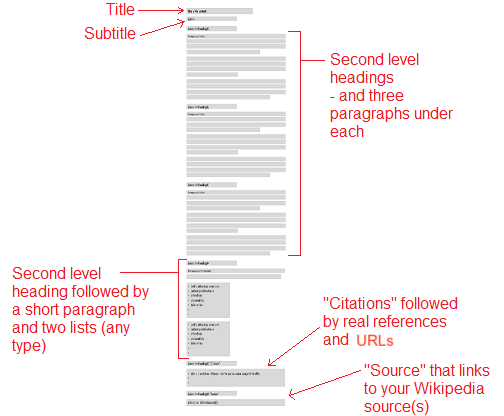
...and remember, all this content should be plain text! No formatting (except maybe the headings, to make them look like headings)
Gather and Prepare Images
Also required with your submission of the Word document, you need to provide at least two image files (usually JPGs).
- IMPORTANT: do not embed the image files in the Word document - keep them as separate files.
- Download and prepare at least two images from your Wikipedia page(s)
- The images must be between about 200 and 350 pixels wide
- Remember: most likely, the images you start with will be larger than 350px. If so you must use image editing software resize them
- Just about any photo editing software will do. You can use Photoshop which is installed on the University computers but that'd be overkill. On Windows machines, try Paint. On Macs, try Preview.
- Rename the image files as needed to make them simple, e.g. "shakespeare.jpg"
- Make sure the names of the image files follow the industry standard of: all lower case, no spaces
Upload your work
- When you've gathered your text content in a Word document and prepared at least two image files upload them to Lab 3: Content Preparation in Blackboard
- Note: Upload the files to Blackboard separately. Do not ZIP/compress them.